
If you run a platform with a dozen or more services behind it, you’ve probably seen this pattern. Service A checks an API key. Service B calls out to your identity provider directly. Service C has a half-finished authentication middleware that hasn’t been touched in a while. Every team solved the same problem differently, and now you have a dozen different places where an authentication bug can hide.
That’s the real cost of not centralizing authentication. It’s not just duplicated code, it’s duplicated risk. When you want to rotate a secret, add a new policy, or swap your authentication provider, you’re not making one change. You’re making that same change everywhere it was copied, and hoping you didn’t miss a service.
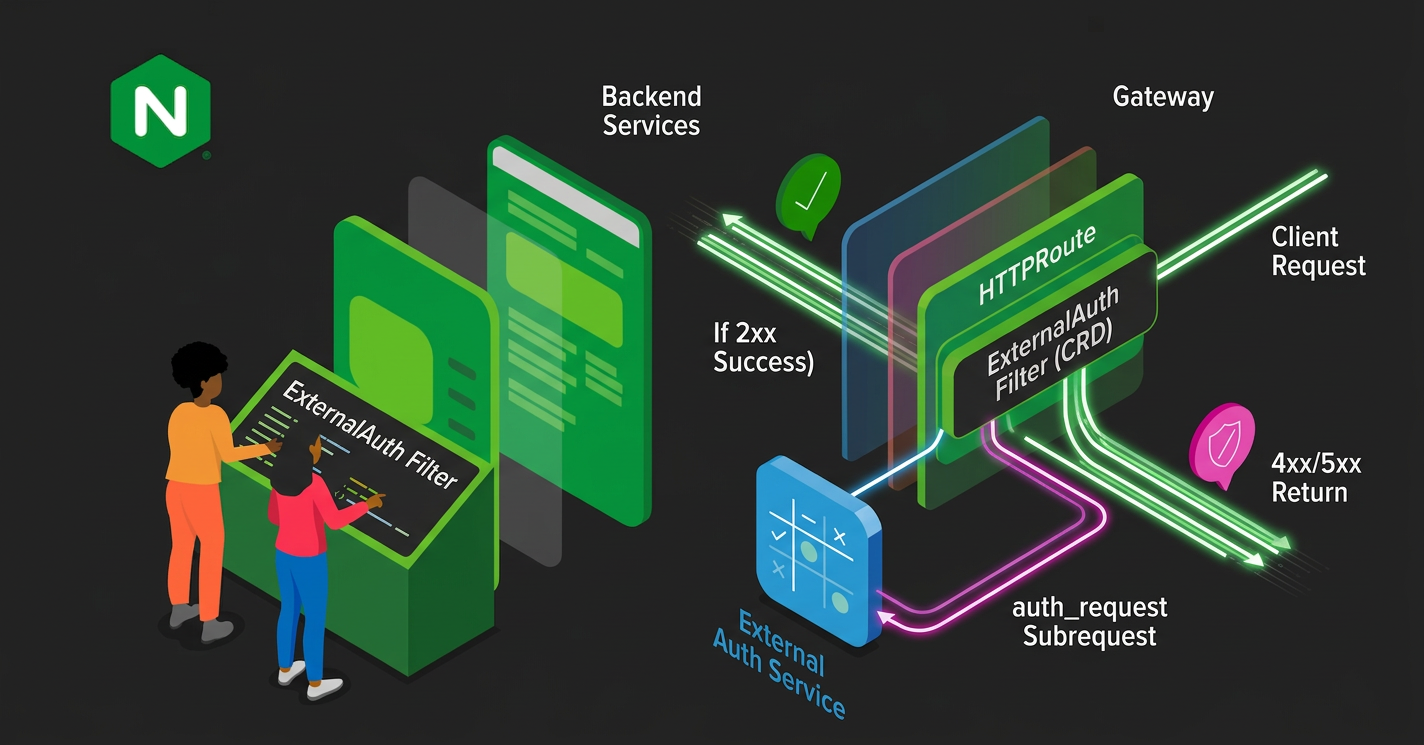
NGINX Gateway Fabric solves this with the ExternalAuth filter. It lets you delegate the authentication and authorization decision for a route to an external service, at the gateway, before the request ever reaches your backend.
What External Authentication actually does
You attach an ExternalAuth filter to an HTTPRoute rule, and from there the gateway handles the rest. When a request comes in that matches the rule, NGINX pauses and sends a subrequest to whatever service you’ve pointed it at. That service looks at the request and responds with a status code. If it’s a 2xx, NGINX lets the original request through to your backend. If it’s not, NGINX returns that status straight to the client and your backend never sees the request.
Under the hood, this is powered by NGINX’s auth_request module. The ExternalAuth filter gives you a declarative way to configure it through the Gateway API, using the same CRDs and patterns you already use for the rest of your routing.
This matters for a few reasons. Your backend teams stop owning authentication logic, they write business logic and let the gateway decide who gets through. You get one place to swap providers too. If you move from a homegrown token check to OPA, or from OPA to OIDC, you change the gateway configuration once instead of touching every service. Behavior stays consistent as well, every request that hits a protected route goes through the exact same check, so there’s no service quietly enforcing a weaker rule because someone forgot to update it.
This is a good fit for internal APIs you want gated off from the rest of the platform, or teams that already run an identity provider or a policy engine like OPA and want to plug it in at the edge.
Setting External Authentication up
ExternalAuth currently ships as a Gateway API experimental resource, so you need the experimental channel installed and experimental features turned when installing NGINX Gateway Fabric.
Install the experimental Gateway API CRDs:
kubectl kustomize "https://github.com/nginx/nginx-gateway-fabric/config/crd/gateway-api/experimental?ref=v2.7.0" | kubectl apply -f -
Then enable experimental features on NGINX Gateway Fabric itself. If you’re using Helm, set nginxGateway.gwAPIExperimentalFeatures.enable to true. If you’re deploying with raw manifests, add --gateway-api-experimental-features to the deployment args.
Once you have NGINX Gateway Fabric installed with experimental features enabled, you need three pieces: a Gateway, an external authentication service, and an HTTPRoute with protected paths. This assumes you already have an application and a Service running in the cluster that you want to protect. In our example the backendRef is coffee, swap that in for your own Service name and port.
Here’s a Gateway listening on HTTP, port 80:
apiVersion: gateway.networking.k8s.io/v1
kind: Gateway
metadata:
  name: gateway
spec:
  gatewayClassName: nginx
  listeners:
  - name: http
    port: 80
    protocol: HTTP
    hostname: "*.example.com"
Your authentication service can be anything that speaks HTTP and returns a status code. Here’s a minimal one built on plain NGINX that checks for an API key header:
apiVersion: v1
kind: ConfigMap
metadata:
  name: ext-auth-config
data:
  default.conf: |
    server {
        listen 8080;
        location / {
            if ($http_x_api_key != "my-custom-secret") {
                return 401 "unauthorized";
            }
            return 200 "ok";
        }
    }
---
apiVersion: apps/v1
kind: Deployment
metadata:
  name: ext-auth-server
spec:
  replicas: 1
  selector:
    matchLabels:
      app: ext-auth-server
  template:
    metadata:
      labels:
        app: ext-auth-server
    spec:
      containers:
      - name: nginx
        image: nginx:latest
        ports:
        - containerPort: 8080
        volumeMounts:
        - name: config
          mountPath: /etc/nginx/conf.d
      volumes:
      - name: config
        configMap:
          name: ext-auth-config
---
apiVersion: v1
kind: Service
metadata:
  name: ext-auth-server
spec:
  ports:
  - port: 80
    targetPort: 8080
    name: http
  selector:
    app: ext-auth-server
In a real deployment this would be a service that validates a JWT, checks it against your identity provider, or runs whatever policy logic your organization already relies on. The contract stays the same either way, respond 2xx to allow, anything else to deny.
Now the piece that actually wires it together, the ExternalAuth filter on your route:
apiVersion: gateway.networking.k8s.io/v1
kind: HTTPRoute
metadata:
  name: coffee
spec:
  parentRefs:
  - name: gateway
    sectionName: http
  hostnames:
  - "cafe.example.com"
  rules:
  - matches:
    - path:
        type: PathPrefix
        value: /coffee
    filters:
    - type: ExternalAuth
      externalAuth:
        protocol: HTTP
        backendRef:
          name: ext-auth-server
          port: 80
        http:
          path: /
          allowedHeaders:
          - X-Api-Key
        forwardBody:
          maxSize: 1024
    backendRefs:
    - name: coffee
      port: 80
A few fields are worth understanding here. backendRef and http.path point at your authentication service and the URI that should receive the subrequest. http.allowedHeaders is the list of headers from the original client request that get forwarded to the authentication service, so if your authentication service needs to read a bearer token or an API key header, it has to be listed here explicitly. Nothing is forwarded by default. forwardBody.maxSize caps how large a request body the gateway will accept and forward for this route, and anything over that limit gets rejected with a 413 before the authentication check even runs.
Once it’s applied, check if the route was accepted:
kubectl describe httproute coffee | grep "Status:" -A10
Send a request without the API key and confirm it gets rejected before it ever reaches your service:
curl --resolve cafe.example.com:$GW_PORT:$GW_IP http://cafe.example.com:$GW_PORT/coffee
The response will be a 401 authorization required:
<html>
<head><title>401 Authorization Required</title></head>
<body>
<center><h1>401 Authorization Required</h1></center>
<hr><center>nginx</center>
</body>
</html>
Now send the same request with a valid API key and confirm it reaches the backend:
curl --resolve cafe.example.com:$GW_PORT:$GW_IP http://cafe.example.com:$GW_PORT/coffee -H "X-Api-Key: my-custom-secret"
You should get a response from the coffee backend, or your own application:
Server address: 10.244.0.151:8080
Server name: coffee-654ddf664b-l9ml5
Date: 16/Apr/2026:20:14:28 +0000
URI: /coffee
Request ID: 217931bc5fe27254d1821cec91e1f2d8
External Auth tradeoffs worth knowing about
Every protected request now costs you an extra round trip. NGINX has to send the subrequest to your authentication service and wait for a response before it can proxy the original request anywhere. If your authentication service is slow, every request behind it is slow. If your authentication service is down, every request behind it fails, because there’s no response to evaluate.
Your auth service needs to be fast, highly available, and monitored, because it’s now a dependency for every request behind it. Centralizing auth doesn’t remove the failure mode, it just moves it to one place.
It’s worth noting that each route rule supports only one ExternalAuth filter. If you need multiple checks, say an authentication step and a separate policy check, you consolidate that logic inside your authentication service rather than chaining multiple filters for a Gateway.
When to use External Auth at the gateway level
If you’re running more than a couple of services behind a shared Gateway API setup and you’ve noticed authentication logic creeping into each one separately, this is the fix. It replaces the pattern of every team hand-rolling their own authentication middleware, and it gives you a single point to enforce policy, swap providers, and audit who’s allowed to do what.
For the full configuration reference, see the ExternalAuth guide in the NGINX Gateway Fabric docs. For more NGINX Gateway Fabric materials, check the links below:
