

Note: Written by a human. In blog diagram graphic made by AI.
NGINX processes HTTP requests in phases. Each phase is designed for specific actions and decisions on the qualities of the request. However, reading of various parts of the request is spread out through multiple phases.
A HTTP request consists of several distinct parts. In the most simple description, it has a:
- Request line that contains the method, URI, and protocol version
- Headers that hold the additional request information
- Body that has the payload. Not all requests have a body.
See this simple example below:
| Part | Example |
|---|---|
| Request line: Method, path, and HTTP version | POST /mcp HTTP/1.1 |
| Headers: Host, type, and session ID | Host: mcp.example.comContent-Type: application/jsonMcp-Session-Id: a1b2c3d4 |
| Body: JSON-RPC tool call | {"jsonrpc": "2.0","id": 1,"method": "tools/call","params": {"name": "get_weather","arguments": { "city": "Paris" }}} |
For HTTP/2 or HTTP/3, protocol-level modifications obscure these parts from direct traffic view, however during the processing of the request all of them are still identified by a server and a client. In HTTP/1, the body is separated from the headers by an empty line.
Regular NGINX request processing
With regular nginx processing, we read the request line and headers, perform the search of a fitting location block, then read the request body.
Further processing of the body can be done with a variety of rules, such as definition of size limits, rate limiting, buffering, timeouts, or storing exceptionally large ones in temporary files. Remember, any data might be in the body, from small JSON requests to streaming media and large uploaded files.
The main reasoning behind the original decision to process body later – is speed and resource consumption. NGINX is very fast, it is able to process many URLs quickly, leaving streaming of unprocessed request body to very simple and heavily optimized algorithms.
Protocols development issues
Engineers who develop higher-level protocols often treat their transport layer as immutable, and develop their required functionality inside the request body of the HTTP requests. This results in a serious complication for middle devices such as proxies and load balancers.
We now have both the HTTP-level of request qualities, and higher-level protocol. In the example above, see the “method” field present in two places.
Traffic administrators, security, and network operations, now have to choose where exactly to search for the required data so their devices can make the routing and security decisions.
New directive: client_body_early_read
In NGINX 1.31.5, we introduced a new directive that changes the order of processing for the request body. When enabled on the http {} or server {} level, client_body_early_read instructs NGINX to read the body before selecting the location block.
Enabling this directive by itself in your older NGINX configuration does not make sense, you need to design the rest of the config for this workflow.
The primary examples of early body reading use are predicate locations, maps, if conditions, NJS, or JSON parsers.
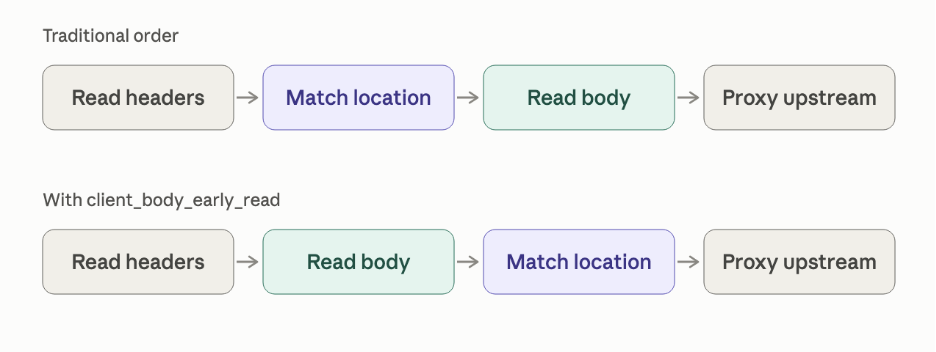
Body reading enables other NGINX modules to read values from it.
- The NJS scripting engine has its own methods for reading the body. However, you can simplify your NJS code by providing the body directly from NGINX.
- The JSON parser module can set a variable to a JSON value using JSONPath selectors. If early body reading is enabled, it can parse the body to find specific values in it.
- Predicate locations operate on variables. You can provide the values from the body to the predicate logic.
A simple example
Let’s start with this simple example configuration:
server {
    listen 8000;
    client_body_early_read 1;
    location /test_body {
        if ($request_body = "BAD_DATA") {
            return 403 "Bad data\n";
        }
        return 200 "OK\n";
    }
}
Test this configuration with these curl commands:
curl -v -X POST -d "SIMPLE_DATA" SERVER_IP:8000/test_body
OK
curl -v -X POST -d "BAD_DATA" SERVER_IP:8000/test_body
Bad data
Enable and disable the early body reading to ensure its correct operation. Don’t forget to reload : )
An advanced example
Let’s imagine the following API call that applications send to the servers:
POST /api/v1/rpc HTTP/1.1
Host: api.coffeeshop.local
Content-Type: application/json
Accept: application/json
Content-Length: 174

{
  "jsonrpc": "2.0",
  "method": "createOrder",
  "params": {
    "product": "Caffe Latte",
    "size": "Large",
    "quantity": 1
  },
  "id": "order-req-1001"
}
Now, let’s route the “createOrder” requests differently from the rest of the API calls, enable request limiters and secure them from public internet.
We will use three NGINX features from the 1.31.5 release:
- Early reading of request body to enable the content before location routing.
- JSON parser and “json_set” directive to find the correct JSON value. We will use a “map” directive to create a true/false condition.
- A predicate location based on that variable.
NOTE: Do not confuse js_set and json_set.
See the NGINX configuration snippet:
http {
    # Enable early reading of the body:
    client_body_early_read 1;

    # JSONPath expression to select the "method" value from the request body:
    json_set $coffee_method $request_body "method";

    # Mapping of the methods to the true/false values. Regex to catch additional characters at the beginning and end of the value
    map $coffee_method $restricted_methods {
        "~createOrder" 1;
        "~deleteOrder" 1;
        default        0;
    }

    # Limiting number of requests for the restricted methods:
    limit_req_zone $remote_addr zone=restricted:7m rate=3r/s;

    server {
        # Predicate location catches the restricted methods from request body when the variable evaluates to true:
        location $restricted_methods {
            limit_req zone=restricted;
            allow 127.0.0.1;
            deny all;
            proxy_pass http://api.coffeeshop.local;
        }

        # Catch-all location
        location /api/v1/ {
            proxy_pass http://api.coffeeshop.local;
        }
    }
}
As you can see, early body reading is a prerequisite and a necessary building block for advanced traffic management with NGINX.
Alternatives and NJS scripting
NGINX has various options for reading the request body through NJS. In previous versions, you could read the body inside the script, make routing decisions in it, then send traffic to a separate location.
There are three methods:
- Use “
js_set” directive and read the “r.variables.request_body” during or after the content phase of traffic flow using “r.requestText” or “r.requestBuffer“. This does not allow us to use it for routing decisions, makes the configuration hard to develop and troubleshoot. Also, “js_set” does not support asynchronous operations such as running timeouts, subrequests, or fetch(). - Use “
js_access” directive and asynchronously read the body inside the script with “r.readRequestText()” or “r.readRequestJSON()“. However, this directive only works in the location context. It means, routing decision has already happened. - Enable “
client_body_early_read” and use “js_set” to read the variable “request_body” in any phase of operation. This is the easiest method of running advanced scripts on the payload before a routing decision.
You can also try alternative scripting approaches with the Lua module but the details are outside of the scope of this post.
Optimization and resource consumption
Reading of request body is an intensive and memory-consuming process. There’s no magic. If your NGINX server needs to make routing decisions on the body, it will consume more memory and CPU. However, you can observe the performance and set up limits on body processing.
Monitoring NGINX memory consumption and CPU usage can be easily done with the system-level tools such as ps or top. Note that modifying the number of NGINX worker processes might be a good idea. Check that the number of workers correspond to the actual number of CPU cores available to your NGINX server, VM, or container.
Conditional configuration
Configure early body reading in a conditional manner, so it only triggers when the body is expected. Use the following examples.
When the Content-Type HTTP header is showing the expected payload type, switch a variable to “1” and use this variable in the client_body_early_read directive.
map $http_content_type $is_json {
    application/json 1;
}
...

client_body_early_read $is_json;
When your APIs are designed like the example below, they only need a body parser in specific endpoints. Use a map like this to switch a variable to “1”. Then similarly to the above example, use this variable to trigger the client_body_early_read directive.
map $uri $is_uploads {
    /api/v1/uploads 1;
}
...

client_body_early_read $is_uploads;
Resource limits
Set up limits on reading the body according to your traffic patterns:
client_max_body_size 256;
client_body_buffer_size 256;
See the appropriate directives’ documentation on https://nginx.org.
To further reduce memory consumption, configure the directive in a conditional way. See the following example:
http {
    map $http_content_type $is_json {
        application/json 1;
    }
    server {
        client_body_early_read $is_json;
        location / {
            return 200 $request_body;
....
In this example, we define a predicate $is_json via a map on the “Content-Type” header. When this header is equal to “application/json” the variable is set to “1”. This variable is caught by the directive and early reading of the body is triggered. All other requests pass through.
Early reading of the body with predicate routing
New features in NGINX 1.31.5 include the predicate locations and a JSON parser.
You can set a variable from the JSON object present in the HTTP request body, and use it as a location block parameter. This will enable routing traffic directly on the JSON fields, bypassing the URLs completely.
Read this blog post for more details: https://blog.nginx.org/blog/predicate-routing-for-native-handling-of-api-traffic
Further reading
Read the reference documentation on client_body_early_read here: https://nginx.org/en/docs/http/ngx_http_core_module.html#client_body_early_read
Read the release notes for NGINX here: https://nginx.org/en/CHANGES
Read the release announcement blog post here: https://blog.nginx.org/blog/nginx-1-31-5-control-api-predicate-locations-early-body-inspection-and-more
Read the code and contribute here: https://github.com/nginx/nginx
