I rate my NGINX skills as basic. I’ve done the normal things: web serving, reverse proxy and a few upstreams, some TLS. If something went sideways, I’d be learning the ins and outs on the fly. That’s great if you want to learn that, but I’m much more interested in evaluating architectures and building systems these days.
So when I realized I could hand a few lines of text to an AI agent and get back a working Kubernetes cluster with NGINX Gateway Fabric routing traffic into it, I felt like a rocket was just bolted onto my workflows.
How I got here
Over the past year I’ve been playing with a range of agents at home, and one of them, nanoclaw, really stuck. I started with services for the frontier labs but eventually built up local AI as I never felt comfortable doing anything too deep with private information on public services. I slowly got comfortable giving nanoclaw access to my lab:
- Pi-hole DNS servers. Low risk, easy to check, easy to undo. High reward. And yes, I have 2 DNS servers in my home network. Because it’s always DNS. First thing I handed over to nanoclaw.
- IPAM and NMS servers. Documentation is always the last thing anyone wants to do. But my agents don’t mind at all. Easy win when I got my agent to build up a NetBox server for me.
- Lab documentation. Keeping track of how everything fits together in a home lab isn’t too bad. But my brain is at capacity and my lab is increasingly complex. A really big win.
- Mini-PC Proxmox servers. I got to the point where my agents were doing the right things. I felt ok with giving them the ability to spin up VMs and beyond on Proxmox.
Each step earned the next one. By the time the agent had a Proxmox API token, it already knew my DNS, my IP plan, and my naming conventions.
The prompt
For some reason, I wasn’t surprised when I handed my agents an API key to Proxmox and it just worked. It seemed lower level and I’ve seen my agents do some cool stuff already. But then I wanted to stand up a Kubernetes cluster to test out a project someone had shared with me. This is the whole prompt I sent:
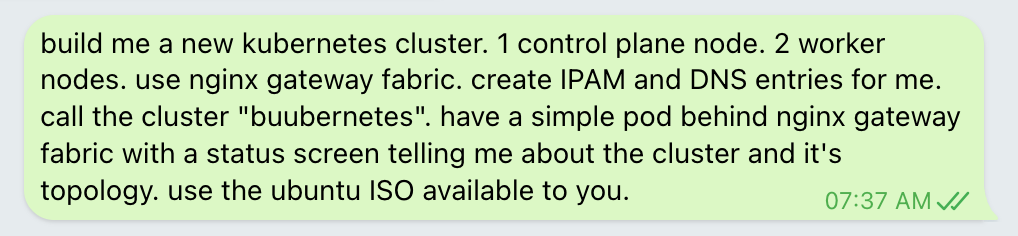
One control plane node, two workers, NGINX Gateway Fabric, DNS and IPAM entries, and a status page that shows the cluster and its topology. No config files. No runbook.
What came back
About ten minutes later, I had this:
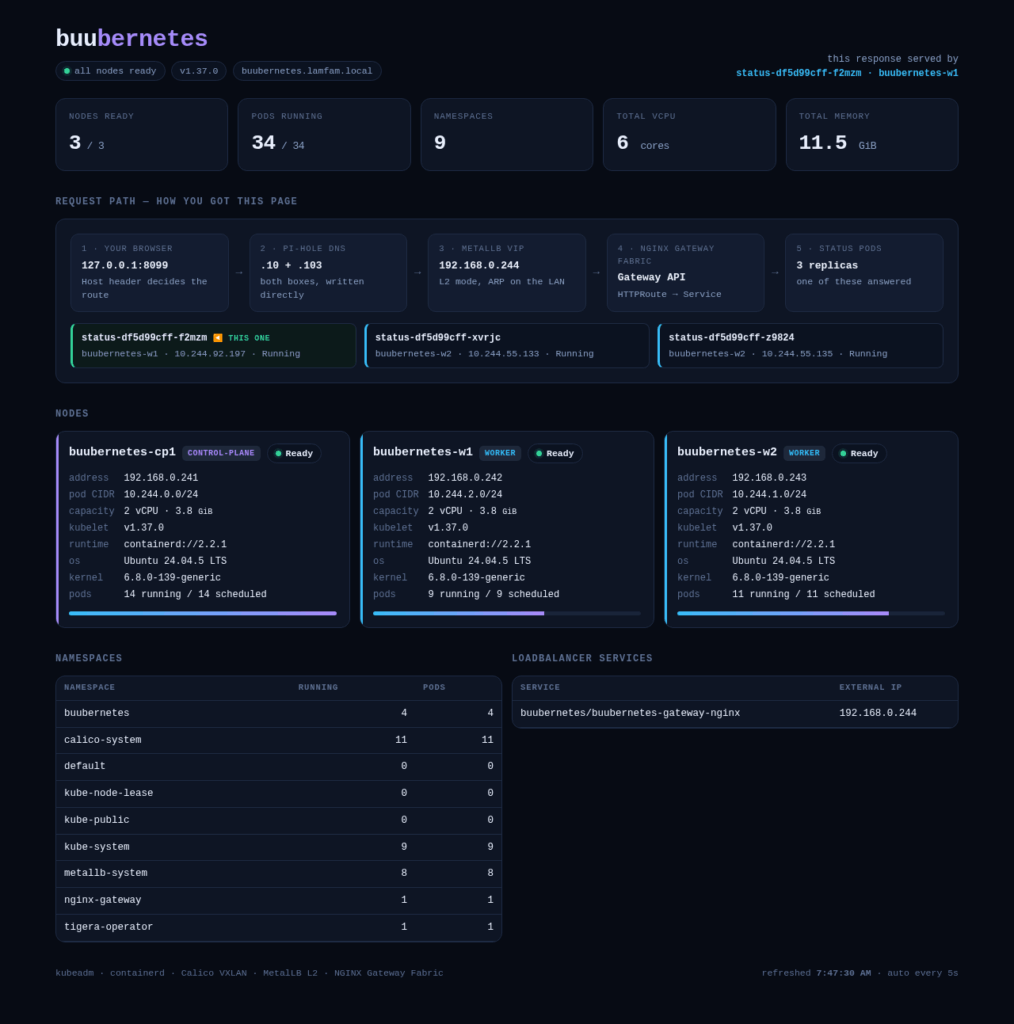
I was a bit taken aback. I’ve seen more than my share of automated deploys before and even agentic installs, but they were all ones where a lot of information was shared in order to guide the install. In this case, I only gave it a couple lines. It figured out the rest.
It built that status page, served from the cluster by three replicas spread across the worker nodes. It reads the Kubernetes API in-cluster, so every number you see is live. It also draws the path my request took to reach it:
Browser → Pi-hole DNS → MetalLB virtual IP → NGINX Gateway Fabric → Pod
The agent built everything behind that path:
| Layer | What it chose |
|---|---|
| Nodes | Three Ubuntu 24.04 VMs cloned from a cloud-init template, with static IPs |
| Kubernetes | v1.37.0 with kubeadm and containerd |
| Networking | Calico (VXLAN) for pods, MetalLB (L2) for load balancer IPs |
| Ingress | NGINX Gateway Fabric v2.7.2 with the Kubernetes Gateway API |
| DNS and records | A records on both Pi-holes, entries in NetBox (IPAM) |
Two details show it wasn’t just following a script. It picked a pod CIDR by hand, because Calico’s default (192.168.0.0/16) is my home LAN. And it pointed the control plane endpoint at a DNS name instead of an IP, so the cluster survives renumbering.
It also didn’t stop at “the pods are running.” Its final check was to curl the page by hostname from outside the cluster, send a request with the wrong Host header, and confirm it got a 404. That proves the Gateway routes by hostname on purpose, not by accident. Then it took a screenshot, because why stop at curl?
How did it know?
Agents need knowledge and it needs to be accurate. It can certainly fumble around – I have seen my share of that. But that is costly in tokens and doesn’t instil trust. NGINX is one of the most widely known open source projects in the world with billions of pulls on Docker Hub and various other stats showing how an incredible amount of the internet runs it. There is a lot of information out there that LLMs would have been trained on already. And the NGINX and the NGINX Gateway Fabric projects, by virtue of being Open Source Software projects, also have great documentation when you go to them directly. Agents don’t have to guess at Gateway API objects. Any agent can examine both the source code directly as well as the public documentation in the project’s repo, as well as other NGINX Kubernetes informational sources such as github.com/nginx/kubernetes.nginx.org. My agent landed on a correct, working setup: a GatewayClass that was Accepted, listeners that came up live, and HTTPRoute objects that routed by hostname.
And at the time of writing this article, we’ve now published a beta version of a CLI tool to help people take care of their ingress migrations as easily as possible.
For me, that’s the point. Clear, current, public documentation is what turns an agent from a risky shortcut into a dependable teammate. And because I’m a basic NGINX user, I’m exactly who needs it. The agent knew the details I’d have spent an evening looking up.
Try it yourself
- Start in a lab, not production. If you haven’t already, take OpenClaw, Hermes, nanoclaw, NemoClaw, any-claw out for a spin. Give the agent narrow access first, then widen it as it earns trust. I suggest trying to break it early and often to get a feel for the edges.
- Try my prompt. Or try even less of a prompt. In the lab, of course.
- Make it prove its work. Ask for a hostname test, a negative test, and a screenshot.
- Keep a human at the gate for anything you can’t undo. It’s still important to know what’s going on. It’s still important to accept the accountability.
- Be sure your agents know about our https://kubernetes.nginx.org/ and NGINX Gateway Fabric documentation pages. I’m sure they would locate them on their own but save yourself a couple tokens by just letting them know.
I’m already planning my next experiment. If you try this, tell me what your agent built!